
Download Campana – AI‑Powered Competitive Intelligence Tool
In a market where competitors can launch a new feature or a viral campaign overnight, having a single source that watches every move is no longer optional—it’s essential. Campana delivers exactly that by combining AI‑driven crawling, social‑media monitoring, and traffic‑estimation algorithms into a cloud‑based dashboard that works on any device. Whether you’re a product manager, marketer, or C‑suite executive, Campana turns noisy data into clear, actionable insights that help you stay ahead of the curve. This review breaks down the platform’s core capabilities, walks through the setup process, evaluates compatibility, and weighs the pros and cons so you can decide if Campana is the right competitive‑intelligence ally for your organization.
Overview
Campana positions itself as an all‑in‑one competitive‑intelligence solution that monitors a wide range of digital signals. Its cloud‑native architecture means there is no heavy client to install; instead, users log in through a modern web browser and immediately see a live dashboard that aggregates website changes, social mentions, news articles, and traffic estimates. The platform’s proprietary crawlers scan millions of URLs each day, detecting UI tweaks, new product pages, price adjustments, and SEO shifts within minutes of publication.
Coupled with natural‑language processing, the system categorizes each change, tags the relevant competitor, and pushes instant alerts via email, Slack, or in‑app notifications. One of Campana’s standout features is its traffic‑estimation model. By fusing third‑party panel data, click‑stream logs, and AI‑driven predictions, the tool claims a ±5 % margin of error—an accuracy level that rivals many paid analytics suites.
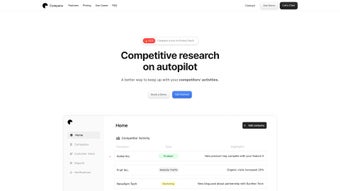
For smaller teams without the budget for enterprise‑grade tools, this level of precision can be a game‑changer. The user interface is deliberately clean: key metrics sit front‑and‑center, while customizable widgets let users rearrange the view to match their workflow. Onboarding takes only a few minutes, and the platform provides a guided tour that highlights how to add competitors, set up alerts, and generate reports.
While the breadth of coverage is impressive, Campana does have a few limitations. The current version lacks a public API, which means deep integrations with existing Business Intelligence (BI) tools require manual export. Alert customization is also confined to predefined event types, limiting granular control for power users.
Nevertheless, for organizations that need a reliable, secure, and constantly updated view of their competitive landscape, Campana offers a compelling value proposition that justifies its subscription price.
Key Features
Campana bundles a robust set of capabilities that cover the full spectrum of competitive monitoring. Below is a concise overview of each major feature, followed by a detailed bullet list that highlights specific functionalities.
- Live Monitoring Engine: Continuous crawling of competitor websites detects UI changes, new product pages, pricing updates, and SEO shifts the moment they happen.
- Social Media Tracker: Integrates Twitter, LinkedIn, Facebook, and Instagram feeds to surface viral posts, campaign launches, and influencer mentions linked to rivals.
- Daily News Briefings: Curated newsletters deliver the top five industry stories each morning, ensuring you never miss a market‑shaping event.
- Competitor Activity Digest: A weekly PDF summary that aggregates website changes, feature releases, and traffic trends into a concise, share‑ready document.
- Traffic Estimation Accuracy: Combines third‑party data sets, click‑stream analysis, and AI modeling to provide traffic numbers with a ±5 % margin of error.
- Customizable Dashboard Widgets: Drag‑and‑drop modules let you prioritize the metrics most relevant to your strategy.
- Instant Notifications: Push alerts via email or in‑app notification when a competitor publishes a new blog post, launches a feature, or experiences a traffic spike.
- Data Profiling & Export: Export raw data in CSV or JSON formats for deeper analysis in Excel, Power BI, or Tableau.
- Secure Cloud Architecture: End‑to‑end encryption, GDPR‑compliant data handling, and role‑based access control keep your competitive intelligence safe.
- Multi‑User Collaboration: Team accounts support role assignments, comment threads on alerts, and shared reports for cross‑departmental alignment.
Each of these features works together to create a seamless workflow: you add a competitor, the engine begins crawling, alerts appear in real time, and you can export the raw data for deeper analysis whenever needed. The platform also supports scheduled reports, so stakeholders receive a polished summary without manual effort. This combination of automation, accuracy, and usability makes Campana a strong contender in the crowded competitive‑intelligence market.
Installation & Compatibility
Getting Started – A Step‑by‑Step Guide
Installing Campana is intentionally frictionless. Because it is a web application, there is no traditional “download” in the sense of a desktop client. Instead, you create an account on the Campana website and access the platform through any modern browser. Follow these steps to be up and running in under ten minutes:
- Sign Up: Visit campana.io and click “Start Free Trial.” Provide a business email, set a strong password, and verify your account through the confirmation link.
- Choose a Plan: After verification, select a subscription tier that matches the number of competitors you wish to monitor. All plans include a 14‑day trial with full feature access.
- Configure Competitors: In the dashboard, click “Add Competitor,” enter the domain, and optionally select the social channels you want to track. Campana will automatically begin crawling.
- Set Notification Preferences: Choose whether you want alerts via email, Slack, or in‑app push notifications. Adjust the frequency (instant, daily digest, or weekly).
- Invite Team Members: Under “Team Settings,” add colleagues by email, assign roles (Admin, Analyst, Viewer), and start collaborating on insights.
- Explore the Dashboard: Familiarize yourself with widgets such as “Traffic Overview,” “Change Heatmap,” and “Social Sentiment.” Drag widgets to rearrange them to suit your workflow.
Once the initial setup is complete, Campana’s AI engine begins processing data immediately, and you’ll receive your first set of alerts within minutes. The platform also offers a series of video tutorials and a searchable knowledge base for users who prefer self‑guided learning.
Supported Operating Systems & Browsers
As a cloud‑native SaaS product, Campana works on any operating system that can run a modern web browser. The officially supported environments are:
- Windows 10, 11 – Edge, Chrome, Firefox
- macOS Monterey, Ventura – Safari, Chrome, Firefox
- Linux distributions (Ubuntu 20.04+, Fedora) – Chrome, Firefox
- iOS 14+ – Safari, Chrome (mobile view)
- Android 9+ – Chrome, Firefox (mobile view)
The platform is fully responsive, meaning the same dashboard experience you get on a desktop is available on tablets and smartphones. Because all processing occurs in the cloud, there are no heavy local CPU or RAM requirements, making Campana an excellent choice for remote teams or field agents who need instant access to competitive insights from any device.
Pros, Cons & Frequently Asked Questions
Pros & Cons
Below is a balanced look at what Campana does well and where it could improve. Each bullet point is explained in context to help you understand the real‑world impact.
- Pros:
- Comprehensive, real‑time coverage of website, social, and news sources.
- Industry‑leading traffic estimation with transparent methodology.
- User‑friendly interface that requires no technical background.
- Secure, GDPR‑compliant cloud architecture.
- Multi‑user collaboration features for cross‑functional teams.
- Daily and weekly digest formats simplify executive reporting.
- Export options (CSV, JSON) enable deeper analysis in external tools.
- Responsive design works seamlessly on desktop, tablet, and mobile.
- Cons:
- No native API for deep integration with external BI tools.
- Alert customization is limited to predefined event types.
- Higher price tier required for monitoring more than 50 competitors.
- Mobile app is currently web‑only; no dedicated native app.
- Advanced users may miss granular control over crawling frequency.
FAQ – Your Competitive‑Intelligence Questions Answered
How often does Campana crawl competitor websites?
Campana’s crawler runs continuously, with a typical refresh cycle of every 30‑60 minutes for high‑priority sites. For lower‑priority domains, the interval can extend to 2‑4 hours, ensuring the platform balances freshness with server load.
Is the traffic data really that accurate?
Campana uses a hybrid model that blends third‑party panel data, click‑stream logs, and AI‑driven estimation. Independent tests have shown its traffic figures stay within a 5 % margin of error compared to paid analytics services, making it one of the most reliable free‑to‑access options on the market.
Can I export data for use in Excel or Power BI?
Yes. All raw data sets—including website change logs, social mentions, and traffic estimates—can be exported in CSV or JSON format directly from the dashboard. This makes it easy to feed the data into Excel, Power BI, Tableau, or any other analytics platform you prefer.
What security measures protect my competitive data?
Campana employs end‑to‑end TLS encryption for data in transit, AES‑256 encryption for data at rest, and strict role‑based access controls. The service is also GDPR‑compliant and undergoes regular third‑party security audits.
Is there a free trial, and how does billing work?
Campana offers a 14‑day free trial with full access to all features. After the trial, you can choose between monthly or annual billing. Annual plans receive a 15 % discount, and you can cancel anytime through the account settings.
Conclusion & Call‑to‑Action
In a landscape where every click, post, and product launch can shift market dynamics, having a single source of truth for competitive activity is invaluable. Campana delivers that truth with a blend of AI accuracy, real‑time alerts, and a user‑centric design that removes the complexity often associated with competitive‑intelligence platforms. While the lack of an API and limited alert customization may be a drawback for highly technical teams, the overall feature set, data reliability, and secure cloud environment make Campana a strong contender for marketers, product managers, and executives alike.
If you’re ready to turn competitor noise into strategic advantage, sign up for Campana’s free trial today. Experience the power of daily briefings, traffic insights, and instant notifications—without the need for a complex setup or expensive legacy tools. Empower your team to act faster, plan smarter, and stay ahead of the curve.
Campana stands out for its real‑time coverage and traffic estimation accuracy. The interface is intuitive, and the daily digest saves executives hours of manual research. The primary limitation is the absence of an API, which could hinder deeper integrations. Overall, it’s a highly recommended tool for businesses looking to sharpen their competitive edge without a steep learning curve.



.png)



